Para mis seguidores en español, la Comunidad CRM/365 tendra un evento muy oportuno para aprender sobre las novedades de Dynamics 365
No te pierdas la Mesa de Expertos este próximo miércoles 16 de Noviembre para aprender sobre las novedades del nuevo lanzamiento que estará disponible en Diciembre 2016 para CRM Online.
Si tienes preguntas esta es tu oportunidad para que respondamos a tus preguntas. Simplemente envia tu pregunta por anticipado medio de Twitter con el hashtag #enfoco365.
Para registrarte en el evento sigue este link: http://www.comunidadcrm.com/blog/event/16-noviembre-microsoft-dynamics-365-comienzo-una-nueva-mesa-expertos/#.WCdO8PkrKUk
Dependiendo del tiempo, haremos demostraciones de los nuevos features tal como la nueva navegación, el nuevo diseñador de procesos, los nuevos editable grids y el nuevo modelo de aplicaciones introducido por Dynamics 365. Esperamos verlos pronto!
Saturday, November 12, 2016

Thursday, October 13, 2016
How to modify the Quick Create form for tasks and activities
This is one of those post that will explain a problem we
have in CRM but unfortunately there is no great solution I know so far for this
problem.
When you insert the social pane in a given entity, you will
notice that there is a quick way to add activities (phone call, task, etc.)
were the user does not have to leave the screen in order to add these records:

This makes the user experience great for adding tasks to a
given record quickly. However, while this is beautiful for customer demos, in
real life things are rarely this simple. For example, we’ve had to add another
required field on the task called “Task Type”, but how can I add this field on
this form?!
Things that I have tried:
1.
Modify the quick create view on Task entity.
However, there are no “Quick Create” forms on task entity:

2.
Try to see if the Quick Create forms are defined
at the parent entity “Activity”. However, this entity has no forms defined
since it is a special entity:

3.
Then I thought maybe I can create my own quick
create form in the task entity and set the form priority higher so it supersedes
the one that comes out of the box. However, when I check the Quick Create form
order I can only see my form:


It seems like
the out-of-the-box quick create form is completely hidden. When I publish my
changes and look my new form is not really used
4.
Then I thought maybe we can remove “Add Task”
from the social pane so that users would be forced to add tasks the old way and
be able to use the form we need. However, the Social Pane is not very
configurable and the only things that can be set is whether to show Activities
or Notes by default, which is really not useful.
So this actually forced us in some cases to remove the
social pane all together and go back to the sub-grid approach. However, if you
need to capture notes then you might be out of luck!
Also note that in the Quick Create menu in CRM, when you try
“Task” it will actually open the default full form, rather than any Quick
Create form that you define, so you have control but you cannot leverage the
quick create feature for activities apparently.

We also tried to hide the activities from appearing in the
quick create menu but this was not possible because you cannot unselect the
setting to show activities in the quick create menu. This is perhaps one of the
most annoying things with quick create and stems from the fact that Microsoft
has locked down the configurability of this feature which often just renders it
useless in the real world but only pretty for customer demos. This sadly seems
to be the case for many features that are also locked down for extension or
configurability. If you have any workaround I’d be very happy to hear!
Thursday, October 6, 2016
Transporting SLAs in a CRM solution
This post explores some of the nuisances when transporting
SLAs in a CRM solution. I did most of my tests in CRM 2015 and CRM 2016
environments but behavior might vary between different versions.
When you include an SLA to the solution there are some
special things that will happen. In this example, I have a blank solution and I
have added only my SLA to the solution. As expected, the only component in the
solution is the SLA itself:

However, after you export the solution for the first time,
you will notice that magically some processes get added to your solution
automatically after export without any indication that this has happened:
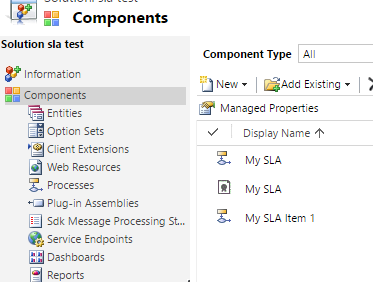
Furthermore, in older versions of CRM (2015) you will also
see that the “Process”, “Case” and “SLA KPI Instance” entities get added to the
solution magically which can be quite confusing:

But why is this happening? The reason why you see some processes
added to the solution is because SLAs are implemented as CRM processes
(workflows) behind the scenes, so at the moment you export an SLA, you need to
export at the same time the process definitions for the SLA. There wil be one
process per SLA plus one additional process for each SLA Item you have added to
your SLA (1 item in my example). That is because SLA Items are also implemented
as workflows. Now, the question of why we have to surface these implementation
details to the user is in my opinion a bug, there is no reason to show the user
these components in the solution and should be hidden because they are
implementation details of the SLA that happen behind the scenes and causes
confusion more than anything about what these processes are. If you try to open
one of these processes you will notice that they are read only and completely
system managed depending on the SLA and SLA Item definitions that you have
provided in the user interface.
Another problem with such implementation is that if you
rename the SLA Items, then their corresponding workflow/process is not renamed
accordingly which can cause even more confusion since they will keep the
original name that was given to the SLA Item during creation. I have even run
in a situation in which solution export fails because it could not find the
corresponding SLA Item process once I had renamed the SLA Item (although I was
not able to reproduce this problem consistently).
The reason why you see the “Case”, “Process” and “SLA KPI
Instance” entities added to the solution in CRM 2015 is most likely a bug and
something that was fixed in CRM 2016. Even if you remove these entities from
the solution, they will get added back automatically next time you export the
solution so not worth trying to remove them manually!
Another thing I wanted to explore is how the Business Hours
get transported in the solution. For example, I have defined my business hours
as follows:

I have found out be inspecting the solution XML that the
business hours are not included at all in the solution, therefore when you
transport the SLA to another environment the business hours will be blank for
the given SLA. You will then need to set it manually in the target environment.
I have researched whether I could use the Configuration Migration utility that
comes with the SDK in order to migrate business hours and include in the
solution deployment package but as it turns out both the Business Hours and the
Holiday Schedule are implemented as entries in the “Calendar” entity which is
not supported by the Configuration Migration tool, and AFAIK is also not
possible to import these using Excel import file. Therefore, you have no option
than to re-create these records in your target environment (manually or
automate via SDK) and link them to the existing SLA. You might be able to
import the individual “Holiday” records to the Holiday Schedule in an automated
fashion such as import but I have not validated that far what can be done.
Luckily creating the Business Hours and Holiday Schedule is
not a very long task, and you should be able to create them only once in each
target environment. After than re-importing an existing SLA should preserve the
link to the Business Hours you had set previously.
Friday, September 30, 2016
Tuesday, September 27, 2016
State Machines in CRM for Status Transitions
Those who come more from an engineering background might be
familiar with the concept of state machines. This article explains an easy
implementation in CRM.
State machines are basically a way to model an object’s life
cycle, including the different states or statuses it can have along with the
transitions that are possible to go from one state to another. In an example
below we have an airline ticket and how the status of the ticket can transition
in different scenarios:

The key about state machines is that it restricts invalid
state changes. For example, you cannot go from “Used” to “paid” because once
the ticket is used, it can no longer change. In some sate machines you might
also want to specify which states are read-only as opposed to “editable” and
you can even define additional conditions such as having the correct privilege
(e.g. only a manager is able to issue a refund).
Now you can apply this concept of state machines to CRM
entities. Although these state machines can be quite complex in real life, in
CRM entities most of the times this is not too complex. If you have a simple
state machine to model, there is the feature in CRM (often overlooked) called
status transitions.

You can actually define which status can lead to which
status. Below is the CRM implementation of the state machine of my example:

Note that CRM requires that for each “Active” status you
must have defined a valid transition to an “inactive” state (at least this is
mentioned in the documentation here: https://technet.microsoft.com/en-us/library/dn660979.aspx
although I’m not sure where it is enforced if it is).
Now in the CRM form you will notice that it will remove the
invalid state transitions from the available status reasons. For example, if my
record is on status reason “Reserved” I cannot change it to “Ticketed” because
I need to mark it as paid first:

If I had not defined a transition from the current status
reason to an “Inactive” state then I am not able to de-activate the record and
change the state to “Inactive”:

Also note that the transition validations are valid even
outside the scope of CRM forms. If you try to perform an invalid status update
from workflow/plugin/SDK you would get this error:
Monday, September 26, 2016
CRM SLA Failure and Warning times, not what you would expect!
When you configure an SLA item in CRM, you have the option
to specify the “Failure” and “Warning” times as a duration.

The format of these fields Is the same as any other CRM
duration field, but what does it really mean? For example, if you set it to 10
days, is it 10 calendar days? Is it 10 business days? You might be surprised it
is neither!
First let’s backtrack a little bit and look at the SLA definition.
At the SLA level you can define “Business Hours” which captures the business
days of the week, business hours of the day as well as any holidays during
which an SLA should not apply. Let’s see what happens to your 10 day SLA
depending on your business hour configuration in different scenarios. For
simplicity I will assume you do not have “pause” when the record is on-hold.
1.
No Business Hours
If you leave this “Business Hours” field blank, then the
system will assume 24x7 and therefore, the “Failure” and “Warning” times you
set are simply calendar days, it will be simply a duration which is quite straight-forward.
Therefore, when you create the record, you will have exactly 10 days (240
hours) before the SLA fails.
2.
Business Hours Configured (Work Days only)
In this case you configure your Business Hours only for the
work days (e.g. Mon-Fri) but you leave the work hours as 24-hour (i.e. your
business day has 24 hours):

In this case, what happens to your 10-day SLA is that it
becomes a 10 business day SLA. Therefore, when you create a case, you will have
14 calendar days before the SLA fails because the weekend days will not be
counted.
3.
Business Hours Configured (Including Work Hours)
Now this is where things get really messy unexpectedly.
Imagine you configure your business hours to be Mon-Fri from 09:00 to 17:00 so
that you have 8 working hours per business day. What happens to the 10-day SLA
failure?

I create a case and to my surprise, the system gives me
almost 42 calendar days to resolve the case before failing SLA:

This seems really random. What happens here is that the “Failure”
time of 10 days is actually a duration
(not the actual count of calendar or business days). In other words, the SLA
will fail after 240 “business hours”. Because I only have 8 business hours per
day then this means 30 business days and because of the weekends it ends up
giving me almost 42 days. This is definitely not what I would expected when I
configured by failure time to 10 days. Therefore, I just decided to leave my
work hours as 12am-12am (24 hours) and then I would fall under #2 above in
which I get 10 business days for resolving the case as I expected.
Adding holidays to your calendar works similar to the work
days, it will just exclude the entire day from the count. Do not expect the
timer to “pause” when you are outside of working hours because the timer has
actually been increased to account for the time that you will have outside of
business hours, so the timer countdown is always real time (duration) and can
only pause when you configure pause for “on-hold” status.
I hope you find this useful, I think unless you have really
fast SLAs (defined in hours or minutes) it almost makes no sense to think about
configuring working hours. My conclusion is that if you SLAs which are defined
in number of days you most likely should leave the work hours to 24 hours in
order for the timer to make sense. Alternatively if you keep working hours you would need to define your SLA items as a function of business hours, so for my example, if the business hours are from 9am to 5pm then that means that for a 10 business day SLA I would need to define my failure time as 10*(number of business hours per day) = 80 hours. The small caveat here is that if you change your business hours then you need to update all your SLA items as the above formula could have changed. In either case you should still configure your workdays to
exclude weekends if desired though.
Tuesday, September 20, 2016
CRM Alternate keys with OptionSet fields
The alternative keys feature introduced in CRM 2015 U1 turns
out to be extremely useful, especially for integration scenrios in which you
might want to keep a record of an “external key” from another system or you
want to enforce duplicate prevention (for real).
In some cases you would like to make the alternative key
contain an OptionSet type of field. For example, I wanted to define an
alternative key based on “Contact Type” and “Email” so that CRM could check
that no contacts of the same type with the same email address.
However, when you try to define the key on the contact
entity I could no select my “Contact Type” field as part of the key:

So I can see a number of fields and realize that only fields
of numeric or text value are available to pick. After some research I found
that it is documented in the SDK that only
these fields can be added to a key:


Now I am able to add the calculated field to my key:

After this is done, I can test to make sure I can create
both a nurse and a doctor with the same email but if I try to create 2 nurses
with the same email I get the error:

So this works. It is not the most elegant solution since you
are essentially duplicating data. However, if you must include an OptionSet
field as part of a key this could be an easy way to enforce it :-)
Enjoy!!
Monday, September 19, 2016
CRM Advanced Find with N:N Relationships
An old CRM problem is that sometimes when you define N:N
relationships between 2 entities, you find this relationship not available for
search in Advanced Find. Don’t worry about it this article will give you the
work-around you need.
Consider a scenario in which I have accounts and I have
industry entities. An account can be in multiple industries and an industry can
have multiple accounts; therefore I have defined an N:N Relationship between
Account and Industry entity:

Now as part of the requirements I want to enable users to be
able to build Advanced Find queries based on this relationship. For example:
- · Find all accounts in the “Banking” industry
- · List the accounts with industry code FIN002
So you might think this is was easy to do with Advanced
find, however, you might not be able to find this relationship when looking for
the related records under account in Advanced Find:

So I went back to the N:N relationship definition to see if
I did something wrong. I found that there is a checkbox called “Searchable” and
was already set to “Yes”:

So why I cannot search based on this relationship? The
answer is tricky. The relationship actually appears in advanced find whenever you
set the “Display Option” to “Use Plural Name” or “Custom Label” on the side of
the relationship with you want to show under the “related” section in advanced
find. In my example, I would need to set the “Display Option” to “Plural Name”
on the Industry side of the relationship so that I can perform the queries such
as retrieving all accounts in a given industry:

After I do this and publish all customizations, the “Industry”
entity magically appears in advanced find allowing me to perform my query:


And voila. Now the only question I still have is: What the
heck is that “Searchable” checkbox on the relationship for? Feel free to comment
if you know the answer J
Monday, August 15, 2016
Business Rules vs. Sync workflows in CRM
With the introduction of the “Entity” scope in Business
Rules, we can now configure them to execute on the server instead of a form
(client-side) logic. However, this brings a dilemma on whether to use business rules
or synchronous workflows for server level validations and business logic
implementation.
Business rules that are defined on the scope of a form opens the door to defining form
business logic that is configurable and requires no coding (something that
previously would require JavaScript). Although there are many limitations to
business rules, they enable simple business logic to be implemented by a
configurator rather than a developer. However, in many scenarios the data in
CRM is not created/updated via a CRM form.
For example, bulk data import, workflows, plugins, API/SDK calls would bypass
the CRM forms and therefore would also bypass any JavaScript or form Business
Rule validations you might have configured. These type of server-side
validation had typically required plugins or synchronous workflows.
Luckily, business rules now have a new scope “Entity” which applies at the server
level instead of the form level. What this means is that these business rules,
just like plugins and sync workflows, will execute even if you are not using a
CRM form in your transaction because they happen on the platform (server side)
instead of the form (browser/client side). There are certainly a large number
of limitations on what business rules can do and there is still a large number
of scenarios for which you must write code (plugins) to implement more complex
rules. However, I sometimes get asked the question: If I can implement my server-side business logic as a business rule or
a sync workflow, which one should I use?
Although I would love to hear from the broader community
what is your position on the question above, I will provide my own personal
view. If the question is asked, then I assume whatever you need to implement
can be done with either business rules or sync workflows (what are the limitations of each is a separate topic not covered in
this post). And in that case my answer is almost always to use business
rules if you can. This is why:
- Business Rules are contained in the entity itself in the solution which I find somewhat cleaner and more organized, you can review which business rules apply to each entity and when exporting a solution (CRM 2016+) decide which business rules to export. You can argue processes have a primary entity and you can use that field for the same “organization” purpose (sure I give you that).
- Business Rules are actually implemented as sync workflows! The business rule is nothing more than an abstraction of a sync workflow but behind the scenes each business rule is converted to a sync workflow. However, I find the abstraction useful, mostly because I can interpret business rules a lot easier in my head than workflows. If you export a solution with a business rule you will notice the business rules are actually “processes” just like sync workflows so there is a conversion layer from entity business rules to sync workflows. What this means is that there are basically 2 separate designers (process designer and business rule designer) that produce the same workflow XAML definition that is executed by the same runtime. While both workflows and business rules are actually stored in the “Process” table/entity there seems to be a slight difference in the triggers: The workflow triggers are stored in the same Process table but the business rule triggers have their own “ProcessTrigger” (anyway that’s all implementation details).
- Workflow designer is quite outdated and probably reaching its end of life. However, it seems Microsoft is investing more and more in the business rules designer and supporting more and more scenarios with each CRM release. I personally find it more pleasant to work with the business rule designer than the old process designer.
On the other hand, sync workflows can be more useful if you
want to at some point enable additional capabilities not supported by business
rules. For example, user-level scope of a workflow (as opposed to Organization)
and some of the other settings available in the process designer which are not
available in the business rules designer.
In summary, sync workflows (and by extension process
designer) have a lot more capabilities than business rules (and business rule
designer). But if you have some business logic which can be implemented with
either, then would suggest using business rules in that case instead of
synchronous workflows.
Tuesday, July 19, 2016
SLA Behavior when Reopening CRM Cases
After a case is resolved, the user can reactivate the case
but what happens to the SLA when this occurs? In some scenarios you might want
to restart the SLA timer while in other cases you’d want to SLA the remain
unchanged. This posts explores a bit both possibilities. Note that this post
was tested with CRM 2015 and enhanced SLAs.
One of my recent requirements was that whenever a case is
reopened, the applicable SLA would need to restart counting again as if it were
a new case that just got created. This lead me to explore what kind of control
we have on SLAs when a resolved/cancelled case is brought back to in progress.
In my first attempt, I had created an enhanced SLA for which
the “Applicable From” field was the CreatedOn field, meaning that the “start”
of the SLA timer is the creation date of the case:

In my test SLA I give the users 5 minutes to resolve the case before the SLA is considered as “failed”. Then I created a case and resolved it after 1 minute which causes the case to succeed the SLA. I can see in the associated SLA KPI instance that everything looks as expected:

Note: The SLA KPI Instance is the entity in CRM that holds
the information about the SLA of a given case, there is one SLA KPI instance
per case that has an SLA.
Now I reactivate the case and notice that although the case
is now active, the SLA KPI instance has not changed, so the case is considered
to have succeeded the KPI even though it is still active (there is no timer
anymore):

I can edit anything in the case and resolve it again and no
change is logged to the original KPI instance and there will be no new KPI
instance either. Even if I leave the case open for months before resolving it,
this case is always considered to have met the KPI. Whether this behavior is
expected or not is debatable because in some other scenarios you might have a
manager re-open a case just to enter som additional information before closing
it again and you might not want to lose the original SLA KPI instance
information in that case. However, in my requirement, the SLA timer should
start again, so what can we do?
It will not be possible to generate a new SLA KPI instance
when a case is reactivated because this feature is not flexible to do so in
CRM. However, we can trick to overwrite the existing SLA KPI instance and
update it as though it were a new case when the case is reactivated. However,
you will lose the historic SLA instance information from the first time that
the case was resolved.
To do so, the first thing you need to do is base your SLA on
some other field that is not the “Created On” date. I believe it is a good
practice to create a custom DateTime field in the case from which you always
base your SLAs so this way you can implement any business logic to set the
value of that field depending on many conditions (something you cannot do with
the CreatedOn field which is read-only and will never change). So I created a
new SLA based on my custom field:

Now I can set a simple business rule to populate the “SLA
start” field with the value of “Created On” whenever a new case is created.
Thus far, my SLA will behave the same as it did when I had it defined based on “Created
On”. The only difference now is that I will also create a workflow which will
update the SLA start field when the case is reopened and will set the value to “Execution
Time” (time the case is reactivated).
When I repeat the same example as before, I notice that once
I reactivate the case, the old SLA KPI instance information is lost and the
entire SLA is recalculated and updated; this happens because a change occurs in
the field on which the SLA is based (SLA start) which forces everything to
re-calculate. So I achieve my requirement of restarting the SLA timer when the
case is reopened. However, I would have much rather liked CRM to generate a new
instance of an SLA KPI each time I reactivate the case so this way I can track
the SLA timer after reopening the case but at the same time I do not lose the
old KPI information which can be useful for reporting. I haven’t found a way to
do so, but I would be happy to hear if anyone has solved this problem.
There I however, a big caveat with this approach and that is
that because the “old” SLA KPI information is lost when reactivating the case
then users can “cheat” by simply reactivating and re-resolving cases for which
they did not meet the KPI and all of the sudden their KPIs look like they never
missed any SLA!
If you don’t want your SLA timer to restart when a case is
re-activated you just need to make sure that the “Applicable From” field that
you use in your SLA definition will never change when a case is reopened (as is
the case with the “Created On” field).
Friday, July 1, 2016
Monday, April 11, 2016
Including Reference Assemblies in plugins
I recently had to reference the Newtonsoft.Json dll from
within a CRM plugin and run into the infamous problem that there is no real
support for referenced assemblies from custom plugins or workflow activities.
This post provides a workaround using ILMerge.
The Problem
This has been a feature gap since plugins were introduced in CRM, you often want to reference external dll libraries from within your plugin. First, let’s look at how the CLR (.Net) loads referenced assemblies in order to understand the problem a little better. During runtime, what happens with referenced assemblies is that the CLR will try to load the referenced assemblies from some predetermined locations. For example, it will try to locate and load that assembly from the GAC or from the same directory as where the current process is executing. When you compile an assembly and it has other references, what happens is that the referenced assemblies get dropped in the same bin folder as your compiled assembly so they can be easily located and loaded at runtime.
That works great, and in CRM there is also the concept of
the “bin” folder but the usage of it is a bit deprecated or not recommended
(see ….). So in theory if you have access to the CRM server you could drop all
your referenced assemblies in the “assembly\bin” folder or you can install your
referenced assemblies in the server GAC and ten they will be able to be loaded
at runtime. However, this is a big problem because you don’t always have access
to the server and because depending on a specific server is risky as your
servers might change, there could be a load balancer with multiple servers,
etc.
So what else can you do if you have to register your plugin
in the database? Well, when you register your plugin in the database what
happens is that CRM will deserialize your dll content and load your plugin type
explicitly, but you have no way of telling CRM that it must also load another
assembly and you have no way to upload a reference assembly to the database.
Certainly all .Net native assemblies like System.dll can be loaded because you
can assume .Net to be available from all CRM servers, but what if your
reference assembly is a third party like Newtonsoft.Json.dll ? In cloud
environments (plugins in sandbox mode), reference assemblies can be dangerous
because you do not know what code they are running in your shared cloud
servers, so this probably explains why there is no support for reference
assemblies in CRM. For plugin assemblies this risk is easily mitigated by running
your plugin under partial trust in the CRM sandbox which uses code access
security, .Net framework’s way of allowing external code to execute in a safe
manner. This is why your plugins would fail to do things like try to read a
local file or shut down the current server (you wouldn’t expect that to work in
cloud environments!).
The Solution
So at this point you are left with 2 options: You can either
compile the source code of your reference assemblies into your plugin assembly
(if you have the source code) or you can ILMerge the reference assembly with
your plugin assembly. In this example I will focus on the second option and I
will illustrate exactly how I did it for the example of Newtonsoft.Json.dll in
the following 3 simple steps:
1. Add ILMerge Nuget to your plugins project
2. Add Newtonsoft.Json Nuget package to your plugins project

3. Now you simply need to edit your project configuration in Visual Studio such that when you build your plugin it automatically merges it with your reference assemblies (so you will never have to manually do ilmerge). To do this go to the “Build Events” tab of your project settings and under “Post Build event command line” box enter the following:
$(SolutionDir)packages\ilmerge.2.14.1208\tools\ILMerge.exe
/keyfile:$(SolutionDir)/.snk /target:"library"
/copyattrs /out:$(TargetDir)$(TargetName)$(TargetExt)
$(ProjectDir)$(IntermediateOutputPath)$(TargetName)$(TargetExt)
$(SolutionDir)packages\Newtonsoft.Json.6.0.6\lib\net45\Newtonsoft.Json.dll
Note you might need to modify the command above
according to the version of the Nuget package you installed in previous step
and you have to specify the location of your SNK file that you use to sign your
plugin assembly.
Now when you build your plugin assembly, the
Newtonsoft.Json.dll is embedded inside your plugin so CRM will not need to load
the reference assembly. There you go, I hope you find this useful and simple
enough.
Monday, March 14, 2016
How to set EntityCollection output parameters in custom actions
One of the greatest things about custom actions is that they
support defining input and output arguments of type EntityCollection. However,
because the process designer does not support UI for consuming this type then
we have to do it via code. This article explains some tips if you think that
could be useful for you.
If you are familiar with custom actions introduced in CRM
2013, you might have noticed that they have input and out parameters. What is
interesting is that a data type “EntityCollection” is supported which means
your action can take as input a number of entities or it can produce a number
of entities as the result (like RetrieveMultiple). The first thing you might
wonder is why the heck would you want to use EntityCollection as output
arguments, it if can’t even be consumed from the workflow designer. But if you
are reading this post chances are you have a scenario in mind. In many cases
you might want EntityCollection as input parameters, but is more unusual to
need an output of EntityCollection. I can think of a few scenarios, and most
recently I had to use this for encapsulating a set of business logic in a
custom action which would then return a set of entities. This custom action
might be consumed from external systems and makes it simple to implement all
the business logic in a custom action so from the external clients it will be
straight-forward to consume this action without having to call various SDK
operations and implementing the logic at the client.
Once you have identified the scenario you need to keep in
mind that the result (output) of your custom action will need to be consumed
only from code (external client, JavaScript, plugins, etc.) because
unfortunately the CRM native process designer is still incapable of
understanding entity collections. Now, how can you set an output parameter in
your custom action that is type of EntityCollection if you cannot do that via
the process designer?
My first instinct was to implement a custom workflow
activity and then insert it in the action definition as a custom process step:

Inside the custom workflow activity, you have full access to
the IExecutionContext, including the InputParameters and OutputParameters
collections. Therefore, I assumed I you could set your EntityCollection output
parameter via code as seen below:

While technically this compiles and executes fine, I was
surprised to see that when calling my action, the output parameter was blank,
even though I was setting the value from the custom workflow activity. I
imagine this might be due to the fact that output parameters are only set after
the main pipeline operation and perhaps the custom workflow activity is executing
a little bit before that thus all output parameters get wiped after the main
operation but before the value is returned to the client.
Therefore, I had to change my approach. I implemented the
exact same code, but this time I used a plugin registered on the PostOperation
of my custom action, this way I can make sure that the main operation has
already passed and whatever I store in the output parameters collection will be
returned to the calling client. This finally worked!

So the lesson here is that setting output parameters (in general)
must be done in the PostOperation part of the pipeline, therefore it can only
be done via plugins!
Keep in mind that setting input parameters as
EntityCollection is more trivial because it is up to the calling client to pass
those parameters, and in this case, although you cannot consume those input
parameters inside the action process designer, you will be able to access them
from either a custom workflow activity inside your action or from plugins. I
tend to prefer custom workflow activities because this way your entire logic is
defined inside the action itself and there is no additional logic running in
plugins, but it depends on the scenario and complexity too.
Monday, January 11, 2016
OptionSet vs Lookup for implementing lists in CRM
In most CRM implementations we experience the dilemma of custom entity
vs. OptionSet for implementing lists. This post seeks to point some of the
considerations to keep in mind when making this decision.
Imagine you want to capture the "Industry" of your leads/accounts as this information might be valuable for reporting and BI. Every organization has different definitions of "industries" because there is no global standard list of industries that is useful for everyone. So you decide to create and maintain your own list of industries. Now the problem becomes: Should you implement this list as an "Industry" entity or should you simply create an OptionSet with the list of industries?
As everything in the technology consulting industry (pun intended), the answer is always: It depends! There is no exact formula of science to solve this dilemma but I've had numerous discussions with colleagues and customers in this respect and I thought of gathering some guidance that might help you decide:
I usually go in the order above to make a decision as the first items have more impact than the last items of the list above. I hope this can help you assess the best solution for your situation, let me know if you have other considerations I missed!
Imagine you want to capture the "Industry" of your leads/accounts as this information might be valuable for reporting and BI. Every organization has different definitions of "industries" because there is no global standard list of industries that is useful for everyone. So you decide to create and maintain your own list of industries. Now the problem becomes: Should you implement this list as an "Industry" entity or should you simply create an OptionSet with the list of industries?
As everything in the technology consulting industry (pun intended), the answer is always: It depends! There is no exact formula of science to solve this dilemma but I've had numerous discussions with colleagues and customers in this respect and I thought of gathering some guidance that might help you decide:
1. How often does this list change and who maintains it?If your list of industries is changing often or if you expect business users to contribute by maintaining this list, it is recommended you implement as a custom entity rather than option set. The reason is that the custom entity adds richer flexibility to create, update or remove values without having to involve IT. You can easily control who can edit the list by leveraging the security roles on the custom entity. However, if your list rarely changes (e.g. list of countries) and it needs to go through IT then you should probably use Option Set.
2. Do you need to support multiple languages?For us in Canada we usually always implement CRM in both English and French. If your industry list is defined as an OptionSet you can support languages much easier because it is just a matter of translating labels so that each user will always see the list in their preferred language. However, if you use a custom entity, the list is data (instead of metadata) and data does not have the notion of language. Things get complicated here. The typical solution is to use a concatenated primary fields in which a workflow automatically appends English and French labels together with a separator. For example you have an industry record called "Travel / Voyage". But this gets too complex if you have more than 2 languages and creates unnecessary long labels. Not to mention language laws dictating which language should appear first can cause a headache. For this aspect, the winner is by far Option Sets.
3. Do you need to capture additional fields?Imagine in our example, you also need to capture an industry code and size along with the industry name. It would be almost impossible to achieve this with Option Sets so you would definitely need to implement your industry list as a custom entity. Even if today you only need the name, consider whether it is likely that in the future you have to capture additional attributes and if so, you should favor using a custom entity over Option Sets.
4. Environment transport and synchronizationThe nice thing about option sets is that when you transport a solution you are also transporting all the labels and values to your target environment and you are sure that the list is consistent in your dev/test/prod environments so you can rely on specific values existing in the list. However, if you implement as an entity, you will never know who will create, update or delete values from one environment and not the other. So you will end up with different value in each environment. Furthermore, you might end up with equal values but different Ids. For example, you might have industry "automobile" in dev with a specific GUID but the same industry in production with a different GUID. This takes me to the next point about:
5. Workflows and reports/viewsYou might want to do industry specific reports or workflows and include logic such as "if this customer is in the banking industry then do X". Using OptionSets this is safe because the value "Banking Industry" is consistent across all environments so you can add such condition to your workflow. However, if you use a custom entity, you cannot rely on values having the same GUID in all environments so you cannot define such logic safely. The workaround would be that in your workflow/view/report you say "if industry.name contains 'banking' then do X". This works in most cases but is not completely safe; for example, somebody might have renamed "banking" to "finance" and suddenly your workflow is broken. The safest is to use an OptionSet which you are sure will exist for a specific value. If you rely on reports and workflows such as the one described above you might be better off using Option Sets.
6. Dependent listsConsider whether your list will have another dependent list. For example list of states/provinces depends on the value selected from the list of countries. You can achieve dependent lists as both OptionSets and custom entities. The only difference is that for custom entities it is easier because you don't need to write any code, simply configure the form to show only states/provinces related to the country selected (assuming there is a relationship between state/province and country). I think this is the least important factor but is a small advantage of custom entities as it is easier to filter the list based on another related value. If you define your list as a custom entity you can even do advanced filtering such as displaying only industries which exist in the country of the current lead (assuming N:N relationship between country and industry). That can be much harder to do via OptionSet (custom development) while it is just a matter of configuring the form in the case of custom entity.
I usually go in the order above to make a decision as the first items have more impact than the last items of the list above. I hope this can help you assess the best solution for your situation, let me know if you have other considerations I missed!
Wednesday, October 14, 2015
Comunidad CRM y la Mesa de Expertos – Otoño 2016
Announcing the Expert Table for Fall 2016 for my Spanish readers, don’t miss out this event!
Come lo ha venido hacienda la Comunidad CRM, estará presentando las novedades de CRM 2016 por medio de una mesa redonda con la participación de varios MVP de habla hispana . Desafortunadamente no podré asistir a este evento puesto que estaré de viaje. Sin embargo, no se pierdan esta increíble oportunidad de aprender sobre las novedades de la próxima versión de CRM y sobre todo la oportunidad de hacerle preguntas a nuestros expertos en vivo. Registrate aqui! Este es el extracto de introducción a la próxima mesa:
Si, leíste bien. CRM 2016. Ya se asoma una nueva versión que estará disponible tanto en CRM Online como On-premises y cargada, muy cargada de novedades por demás interesantes.
Es por ello que los expertos más destacados de habla hispana en Dynamics CRM se vuelven a reunir para compartir las novedades de esta nueva versión, entre otras:
- La nueva experiencia de servicio – el Interactive Service Hub
- La nueva versión de la Base de Conocimiento
- Power BI para Servicio
- La nueva app para Outlook
- La nueva búsqueda
- Trabajo desconectado (“offline”) y novedades en las apps móvliles
- Plantillas para integración con Excel y Word
- OneDrive
- Novedades de la plataforma
- Social CRM
Y hay muchas más novedades! Inscríbete y compártenos que opinas de CRM 2016. Recuerda utilizar #mesa2016.
Aprovecho también para felicitar a los líderes de la comunidad de todo su esfuerzo para compartir contenido y crear conocimiento a nivel mundial sobre CRM en español. También los invito a navegar el sitio para ver la cantidad de recursos y cursos a su disposición.
Tuesday, October 13, 2015
Don’t forget your case title and customer
Case is a special entity in CRM because it has many out-of-the-box special logic. Sometimes this can be problematic as it forces us to use some fields we might not need.
I’ve always found many customer scenarios in which the “Customer” field adds no value to the case and we would like to remove it. Although less often, you might have found a scenario in which the “Title” field of the case is also not needed. The bad news is that CRM forces you to use those 2 fields in the case, otherwise you might encounter some issues.
For the “Customer” field you can get around it but you need a plugin which is going to set your customer to a dummy hard-coded customer on the Pre-Validate operation whenever a case is created. I haven’t seen this work with sync workflows or business rules (although I haven’t investigated much), unfortunately seems like a plugin might be required for this. Once you have this plugin you can simply hide the Customer field from the form, make it read only and remove this field from all the views. Then your Customer field will be used but not really used. Note that in order to hide this field from the form you might want to make it read-only and then move it to a new "section and hide the entire section. This will help you keep things clean on your form by moving all the “unused” but “locked” fields in a hidden form section.
Regarding the title field, CRM will not prevent you from not using this field. You can also hide it an make it read-only and things will seem to work fine. However, as soon as you start using SLA’s you will run into this problem:
Workflow '{F5245D54-9BA6-4E4B-AB86-9131A076FB4D}' failed due to error: Unhandled Exception: System.Collections.Generic.KeyNotFoundException: The given key was not present in the dictionary.
at System.Activities.WorkflowApplication.Invoke(Activity activity, IDictionary`2 inputs, WorkflowInstanceExtensionManager extensions, TimeSpan timeout)
at System.Activities.WorkflowInvoker.Invoke(Activity workflow, IDictionary`2 inputs, TimeSpan timeout, WorkflowInstanceExtensionManager extensions)
at Microsoft.Crm.Workflow.SynchronousRuntime.SynchronousWorkflowActivityHost.ExecuteWorkflowUsingInvoker(Activity workflow, ICommonWorkflowContext context)
at Microsoft.Crm.Workflow.SynchronousRuntime.SynchronousWorkflowActivityHost.StartWorkflow(WorkflowActivationData activationData, ICommonWorkflowContext context)
As you might know, SLA works as workflows behind the scenes. As soon as you create SLA’s there are some background processes (workflows) created which represent the SLA you have created. Some of these workflows are synchronous and it turns out that if your case has no title, the workflow fails with the above error message preventing the creation of the case. This can be easily fixed by either using the case title or placing some dummy value in it. In our case we simply copied the ticket number into the case title. However, one must admit that it is difficult to arrive to such conclusion from the error message above, that is why I’m sharing this finding, I hope you find it useful!
Subscribe to:
Posts (Atom)